> For the complete documentation index, see [llms.txt](https://docs.decisionrules.io/doc/llms.txt). Markdown versions of documentation pages are available by appending `.md` to page URLs; this page is available as [Markdown](https://docs.decisionrules.io/doc/space/jobs.md).
# Jobs
A *job* is a long-running process that evaluates an Integration Flow in the background.
The main difference to the typical rule evaluation, where the rule is triggered via REST API and the caller is waiting for the response, is that when the Integration flow is triggered a background Job is created for the evaluation that the caller doesn’t wait for. A Job waits in a queue until it is ready to be evaluated and then starts its evaluation, it can then run for an indefinite amount of time (unlike a typical rule it is not limited by the rule timeout).
{% hint style="info" %}
Discover differences between Integration Flow and Decision Flow in dedicated article: [Decision Flow vs. Integration Flow](/doc/rules/flow/decision-flow-vs.-integration-flow.md)
{% endhint %}
As mentioned above, the only way to use jobs for evaluation of rule is to use Integration Flow.
### Managing Jobs
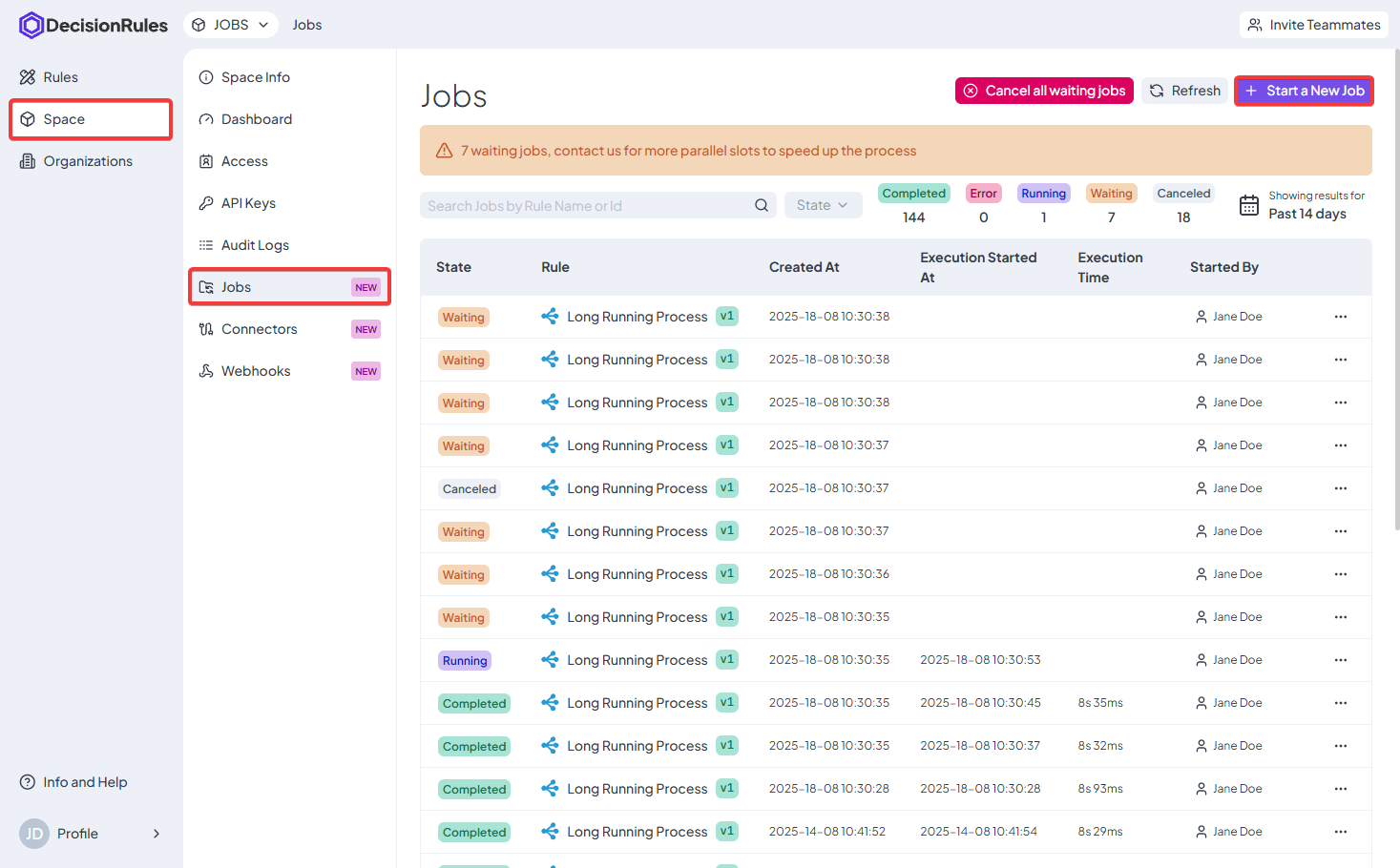
All job for a particular space are available in the *Jobs* menu accessible from the Homepage via Space-> Jobs.
In the list you will see all the executed jobs with some basic information and most importantly their state, you can also cancel a job in this menu if you want to interrupt its execution.
### **Starting a Job**
You can start a job directly from the Jobs page:
1. Click **Start a New Job**.
2. In **Select Rule**, choose the Integration Flow to run.
3. Enter the input in **Input Data** (JSON). The fields from the rule's input model are filled in for you.
4. If the space offers more than one solver version, choose one from the menu on the **Start a New Job** button. The space's default is preselected.
5. Click **Start a New Job**.
The job appears in the list with the state **Waiting** and moves to **Running** when its execution starts.
{% hint style="info" %}
The versions offered are the ones enabled for the [space settings](/doc/space/settings.md). To start jobs from your own code, use the [Jobs API](/doc/api/jobs-api.md) and set the solver version in the request.
{% endhint %}
### Jobs in the Integration Flow Designer
In an Integration Flow, the left-hand menu "Jobs" shows a list of jobs running for the selected rule. When you click on a job, you can see its current execution details in the designer. If the job has already finished, you will instead see its output, logs, and other execution details.
### Jobs states
The jobs can be in one of the states based on the following list
* Waiting
* The job is created and waiting in a queue to start the execution
* Running
* The job is currently being executed
* Completed
* The job finished its execution and return the output data
* Error
* Something went wrong during the execution and the job failed to finish
* Canceled
* The job was manually interrupted
* Cancelling
* The job is currently being terminated
### Counting Jobs executions and billing
The jobs executions are billed according to the amount of **time spent** on their executions (unlike typical API calls which are billed based on the amount of calls made).
Your account has a certain number of free seconds that can be spent executing jobs (this can be monitored in the [Profile Dashboard](/doc/profile/dashboard.md) of your account under Jobs - current usage), any executed jobs will count towards this limit.
#### Pay as you go - disabled
If the limit is reached and pay as you go is disabled, the system will prohibit you from starting any new Jobs executions, **but all the currently triggered jobs will be completed and any time over the limit will not be billed.**
#### Pay as you go - enabled
If the limit is reached and pay as you go is enabled, then the executions continue and the time is billed accordingly.
{% hint style="info" %}
More about Pay-As-You-Go option in Profile section [here](/doc/profile/pay-as-you-go.md).
{% endhint %}
---
# Agent Instructions
This documentation is published with GitBook. GitBook is the documentation platform designed so that both humans and AI agents can read, navigate, and reason over technical content effectively. Learn more at gitbook.com.
## Querying This Documentation
If you need additional information that is not directly available in this page, you can query the documentation by asking a question.
Perform an HTTP GET request on the following URL with the `ask` and `goal` query parameters:
```
GET https://docs.decisionrules.io/doc/space/jobs.md?ask=&goal=
```
`ask` is the immediate question: it should be specific, self-contained, and written in natural language.
`goal` is what the user is ultimately trying to achieve, the reason they need the answer. Sharing it helps GitBook give you a better, more relevant answer. A goal is most helpful when it describes the outcome the user wants rather than restating the question. For example, with `ask=how do I create an API token`, a goal like `automate deployments from our CI pipeline` lets GitBook tailor the answer to that use case.
The response will contain a direct answer to the question and relevant excerpts and sources from the documentation.
Use this mechanism when the answer is not explicitly present in the current page, you need clarification or additional context, or you want to retrieve related documentation sections.